Where is the filter reset button on a Levoit air purifier?
The reset button on your Levoit air purifier differs by the model. There are several possible locations for it. It could be the sleep mode button with a crescent symbol on the LED display of your air purifier unit, the check filter indicator button on the LED display, or the control (power) button.
Here’s a brief highlight of the location of the filter reset button on different models of Levoit air purifiers. Feel free to click on the links for more information from the Levoit Amazon Store and Levoit.com:
| S/N | Levoit air purifier model | Location of reset button – Duration |
| 1 | Core 200S Smart True HEPA Air Purifier Model: Core 200S |
 Sleep Mode button – 3 seconds Sleep Mode button – 3 seconds |
| 2 | Core 300 True HEPA Air Purifier Model: Core 300 |
 Check filter indicator – 3 seconds Check filter indicator – 3 seconds |
| 3 | Core 300S Smart True HEPA Air Purifier Model: Core 300S |
Sleep mode button – 3 seconds |
| 4 | Core P350 Pet Care True HEPA Air Purifier Model: Core P350 |
Check filter indicator – 3 seconds |
| 5 | Core 600S Smart True HEPA Air Purifier Model: Core 600S |
Check filter indicator – 3 seconds |
| 6 | Core Mini Air Purifier Model: LAP-C161-KUS |
Check filter indicator – 3 seconds |
| 7 | LV-H126 Personal HEPA Air Purifier Model: LV-H126 |
No resetting needed. Use the filter reminder wheel on back of unit to monitor filter replacement Use the filter reminder wheel on back of unit to monitor filter replacement |
| 8 | LV-H128 Desktop True HEPA Air Purifier Model: LV-H128 |
 Control button (front rings) – 3 seconds Control button (front rings) – 3 seconds |
| 9 | LV-H132 Personal True HEPA Air Purifier Model: LV-H132 |
 Check filter indicator – 3 seconds Check filter indicator – 3 seconds |
| 10 | LV-H133 Tower True HEPA Air Purifier Model: LV-H133 |
Check filter indicator – 3 seconds |
| 11 | LV-H134 Tower Pro True HEPA Air Purifier Model: LV-H134 |
Check filter indicator – 3 seconds |
| 12 | LV-H135 Console True HEPA Air Purifier Model: LV-H135 |
Check filter indicator – 3 seconds |
| 13 | LV-PUR131 True HEPA Air Purifier Model: LV-PUR131 |
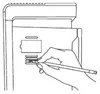 Black Filter Indicator Reset Button in the vent on the side of the air purifier. Use a paperclip, small flathead screwdriver, or other small object to press it for ~10 seconds. Black Filter Indicator Reset Button in the vent on the side of the air purifier. Use a paperclip, small flathead screwdriver, or other small object to press it for ~10 seconds. |
| 14 | LV-PUR131S Smart True HEPA Air Purifier Model: LV-PUR131S |
Black Filter Indicator Reset Button in the vent on the side of the air purifier. Use a paperclip, small flathead screwdriver, or other small object to press it for ~10 seconds. |
| 15 | PlasmaPro™ 400S Smart True HEPA Air Purifier Model: PlasmaPro 400S |
Sleep mode button – 3 seconds |
| 16 | VeSync Core 400S Smart True HEPA Air Purifier Model: Core 400S |
Check filter indicator – 3 seconds |
| 17 | Vista 200 True HEPA Air Purifier Model: Vista 200 |
Check filter indicator – 3 seconds |
| 18 | Vital 100 True HEPA Air Purifier Model: Vital 100 |
 Check filter indicator – 3 seconds Check filter indicator – 3 seconds |
| 19 | EverestAir™ Smart True HEPA Air Purifier Model: LAP-EL551S-AUS |
 Check filter indicator – 3 seconds Check filter indicator – 3 seconds |
https://plentifulair.com/