Steps to reset a Levoit air purifier filter light
The Levoit air purifier has a “check filter” indicator that lights up as a reminder to check your filter life. Sometimes it means you have to replace the current filter, but many times, you only need to confirm that your filter is in good shape.
So once you’ve confirmed, you’ll need to reset the air purifier for the indicator to begin a new running cycle.
How do you reset the air purifier filter light?
- Make sure your air purifier is plugged in and turned on.
- Locate the reset button on your purifier unit. (See the table provided below)
- Press and hold down on that button for about three to ten seconds until the light goes off.
Once the light is off, your check filter indicator is reset, and will begin a new reading cycle for the next automated notification.
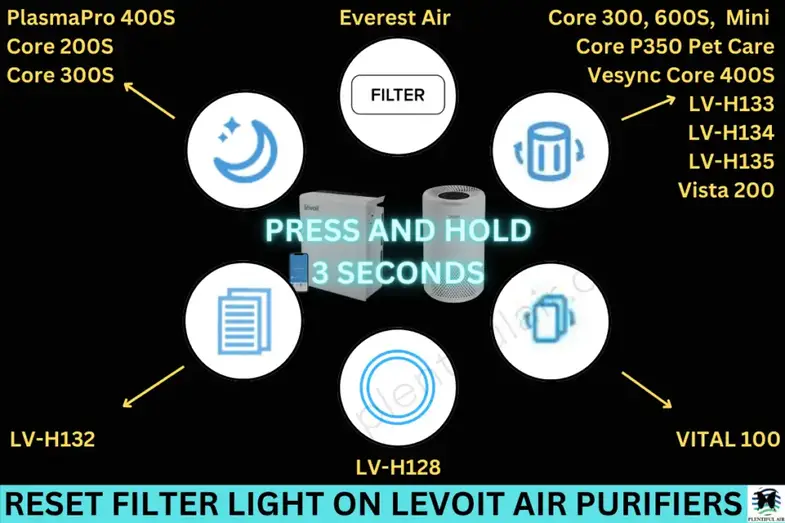
There are times when you do need to change the filter before resetting the air purifier. This could be because it has reached the recommended time frame for replacement, it looks very dirty or has debris lodged in it, is damaged, or because it has stopped functioning as it should.
Follow the steps below to replace the filter.
- Turn off and unplug the Levoit air purifier
- Remove the back cover of the unit
- Take out the old filters from the housing in the unit and dispose appropriately
- Clean out the purifier for dust and other particles using a vacuum hose. Do NOT use water for cleaning.
- Unwrap the new filters, and place them into the housing.
- Replace the back cover
- Plug in the air purifier
- The light should come on automatically. If it doesn’t, reset by pressing down on the reset button for a few seconds until the light turns on. Then press down again until the indicator light turns off.
Remember, you want the light to be turned OFF since ON means “check your filter”.
This check filter light is a useful maintenance feature for your Levoit air purifier. It keeps you up to date on your filter life and reminds you when it’s time for a new filter.
https://plentifulair.com/